A gate that can't be talked round
done writes nothing while the gate fails. An agent that
rewrites a scenario to pass its own test fails the attempt, with the
diff fed back.
[ v0.20.0 ] — From a plan to proven requirements
Specgate turns your client's brief into requirements and Gherkin scenarios, stops your agent from inventing what the brief never said, and refuses to call anything finished until a test proves it — the same gate on your laptop and in CI.
Get started See it on six real products
npm install -g @rsaglobaltech/specgate
specgate init     # in your project: touches no code
specgate # where you stand, and what to run nextZero runtime dependenciesAny agent CLIMITEvery command tested end to end on Linux, macOS and Windows
Most teams already write requirements. They live in a wiki, drift from the code within a sprint, and nothing fails when they disagree. Point a coding agent at that and you have automated the drift — at the speed of an agent.
Specgate makes the specification a thing that can be wrong:
every requirement has a scenario, every scenario a test that names it,
and specgate check fails the moment one link breaks. Then —
and only then — an agent is worth pointing at it.
The pipeline
Your plan or a client's email, kept as it is. Four fields on top — product, surfaces, actors, modules — say what to draft and what to check it against.
docs/brief.md
Your agent drafts one module. Every value the brief never gave is listed as an assumption or becomes a question for the client.
specgate draft <module>
A test that names REQ-007 is the link. The matrix is
generated from what your tests say; nobody edits it.
// REQ-007
The specification, the matrix and your own suite. A requirement is done only when all three pass — for a person, an agent or CI.
specgate done · check
Where it fits
Specgate covers the Dev side, from plan to release: what to build, and when it is done. Its sister tool, forja, builds the project that code lands in. Running and watching production stays with your platform; what it learns comes back as a requirement.
Specgate
The brief becomes requirements with scenarios. What the brief never said becomes a question, not a guess.
specgate draft <module>
Specgate harness · forja
forja writes each use case where the architecture expects it; the harness gives an agent one requirement per worktree.
forja add usecase · specgate harness run
forja
A project that builds and boots on the first run: Node monorepo or a Spring Boot / Quarkus API.
forja init
Specgate · forja
Tests from the first commit. A requirement is done only when a test names it and the suite passes.
specgate done REQ-007
Specgate
The same gate before every merge, and a page that says where the product stands.
specgate check · report
forja
Production Dockerfiles for the Java API and the web app. Shipping them is your platform's job.
forja init --extras docker
Your platform
Running it: hosting, scaling, incidents. Neither tool does this, and neither pretends to.
—
Your platform
Metrics and user feedback. What they reveal comes back as a new requirement, and the loop starts again.
specgate new "…"
Your journey
Pick where you start. Each phase says who does the work — you, your agent or the gate — what to run, what you see, and what you have when it is over.
Phase 1 about 5 minutes
Create the project with your own tools — npm init, Spring Initializr, cargo new — then let Specgate set itself up in place. It writes specifications, never application code.
$ npx @rsaglobaltech/specgate@latest init
    + spec.md
    + AGENTS.md
    + docs/specs/traceability.md
$ specgate config set test_cmd "node --test"
  ✔  test_cmd = node --test
$ specgate check
  ✔  Specification   validate --strict
  ✔  Tests           node --test
  ✔  Gate passed
You now have a specification, an agent contract every coding agent reads, and a gate that already runs your tests.
From scratch · phase 1, step by step →Phase 2 an hour per module
Save the client's brief — or your own plan — as docs/brief.md. specgate draft explains the four fields it needs on top (your agent can propose them), then names the next module; specgate draft bookings opens it and writes the prompt for your agent. Run it again and it stops on anything the brief never said. What only the client can answer becomes a question, not a guess.
$ specgate draft
  Progress  ░░░░░░░░░░  0 of 2 archived
    ○ bookings  not started
$ specgate draft bookings --agent "claude -p"
  ✖  D6_unlisted_value  SCN-005 states "5", which is not in the brief
# the fee becomes a question for the client
$ specgate draft bookings
  ✔  Ready to review
   3  ➜ specgate change archive draft-bookings
$ specgate change archive draft-bookings
  ✔  Archived as 2026-01-01-draft-bookings
You now have requirements and Gherkin scenarios a person reviewed, every invented value either sourced or asked about.
Write the brief, step by step → From scratch · phase 2, step by step →Phase 3 per requirement
specgate status names the single next command to run. Write the test first and name the requirement in it — that mention is the link. Build it by hand, or hand it to the harness: one branch per requirement, and it stops if the gate says no.
$ specgate status
  To do ──────────────────────────────
    ○ REQ-002  A member books a court for one hour
  Waiting for an answer ──────────────
    ○ REQ-004  A member cancels a booking   an answer to Q1
$ node --test
✔ REQ-002 SCN-002: booking a free court lasts one hour
$ specgate harness run --req REQ-003
your agent, in its own git worktree
You now have code and a test that names its requirement — on a branch, waiting for your review.
From scratch · phase 3, step by step →Phase 4 seconds
done runs the gate for that requirement and marks it Implemented only if it passes. A requirement waiting for the client cannot be closed. report turns it all into one page for the product owner.
$ specgate done REQ-002
  ✔  Specification   the gate, for REQ-002
  ✔  REQ-002 → Implemented
$ specgate done REQ-004
  ✖  REQ-004 not marked Implemented: REQ-004 is waiting
     for an answer (Needs Clarification).
$ specgate report --out report.html
  ✔  Wrote report.html
  █████░░░░░░░░░░░░░░░  1 of 4 implemented
You now have a requirement marked done because a test proved it — and a page that says where the product stands.
From scratch · phase 4, step by step →Phase 5 five commands
Put the gate on every pull request — the specification, then your tests. This is what CI runs, and it is the same command you run locally. From then on the loop is specgate status, specgate new, a test that names the requirement, specgate done, specgate check — by hand, as slash commands, or as MCP tools.
$ specgate ci init --provider github
    + .github/workflows/spec-gate.yml
  ✔  CI gate installed
$ specgate new "A member sees which courts are free on a day"
  ✔  REQ-005 A member sees which courts are free on a day · Draft
$ specgate
  ➜  specgate done REQ-005
     once a test mentions REQ-005
You now have a gate on every pull request, and a loop small enough to remember.
From scratch · phase 5, step by step →Phase 1 about 5 minutes
onboard reads your build files and proposes the capabilities your layout already implies. init adopts the repository in place — specifications only, not a line of your code — and the gate runs your existing tests.
$ specgate onboard
  3. Capabilities this codebase already implies
     · Invoices    src/invoices   (2 files)
     · Customers   src/customers  (1 files)
$ specgate init
  Existing code found (package.json) — adopting this
  repository in place. Nothing in your code is touched.
$ specgate check
  ✔  Gate passed
You now have a specification seeded from your own layout, an agent contract, and a green gate over the tests you already had.
Existing project · phase 1, step by step →Phase 2 minutes per behaviour
Don't back-fill everything. Pick one behaviour your users depend on and write it as a requirement with a real example — the numbers your code already produces.
$ specgate new "An invoice total is rounded to the cent"
  ✔  REQ-004 An invoice total is rounded to the cent · Draft
$ cat features/an-invoice-total-is-rounded-to.feature
  @REQ-004 @SCN-002
  Scenario: Three lines at 21% VAT
    When its total is computed at 21% VAT
    Then the total is 35.56
You now have one behaviour written down as a requirement and a scenario anyone can read.
Existing project · phase 2, step by step →Phase 3 minutes
done refuses while nothing proves it. Name the requirement in the test you already have — that is the whole link — and run it again. It marks it Implemented only if it passes.
$ specgate done REQ-004
  ✖  Specification   the gate, for REQ-004
     [TDD-1] Test artifact is TBD but status is 'Implemented'
test("REQ-004: three lines at 21% VAT are rounded…")
$ specgate done REQ-004
  ✔  REQ-004 → Implemented
You now have your first requirement proved by a test that already existed.
Existing project · phase 3, step by step →Phase 4 one commit
Requirements still in Draft owe nothing yet, so you don't have to fix the past first. This is what CI runs on every pull request: the specification, then your tests.
$ specgate ci init --provider github
    + .github/workflows/spec-gate.yml
$ specgate check
  ✔  Specification   validate --strict
  ✔  Tests           npm test
  ✔  Gate passed
You now have a gate that protects what you have proved and ignores what you haven't written down yet.
Existing project · phase 4, step by step →Phase 5 one module at a time
Every bug fix adds one behaviour; every new module starts with specgate draft <module>. status always says the single next command to run.
$ specgate status
  Requirements  █████░░░░░░░░░░░░░░░  1 of 4 done
  ➜  specgate plan
You now have coverage that grows with the work you were doing anyway.
Existing project · phase 5, step by step →Already on OpenSpec? Keep it — Specgate can verify what it calls done →
Why teams pick it
done writes nothing while the gate fails. An agent that
rewrites a scenario to pass its own test fails the attempt, with the
diff fed back.
What the brief cannot answer is asked, not guessed. The requirement it blocks waits for an answer — no person and no agent can close it in the meantime.
specgate draft lists every value nobody gave you. On a
five-line brief that list is long — and it is exactly the conversation
to have with the client.
The harness drives any CLI that takes a prompt, one git worktree per requirement. It never talks to a model itself, and it never merges.
The gate runs the test command you already have. Proven on Node, Spring Boot and Quarkus; it adopts a repository without touching a line of its code.
A test that mentions REQ-007 is the link. The matrix is
derived from what your tests say, so it cannot drift from them.
Not a mockup
Three real runs of this version of the CLI, captured
with npm run docs:terminal and committed. A test checks they
were recorded from v0.20.0, and that every refusal you see is still a
refusal.
A four-sentence brief. The agent's draft invents a fee; the checklist catches it, and the fee becomes a question for the client.
~/courts $ cat docs/brief.md
---
product: Court bookings for a tennis club
surfaces: [api]
actors:
  - { name: Member, surfaces: [api] }
modules: [bookings]
---

# Brief

Members book a court for one hour. A court cannot be booked twice for
the same hour. Members can cancel a booking. Late cancellations may be charged.

~/courts $ specgate draft bookings
  ◆ specgate · draft bookings   docs/brief.md

  3 requirement(s) · 4 scenario(s)

  ✖  D6_unlisted_value  SCN-002 states "201", which is not in the brief and not listed as an assumption for SCN-002 or REQ-002.
     fix: List it in assumptions.md with SCN-002 (or REQ-002) in its row, or use the value the brief gives.
  ✖  D6_unlisted_value  SCN-004 states "court already booked", which is not in the brief and not listed as an assumption for SCN-004 or REQ-003.
     fix: List it in assumptions.md with SCN-004 (or REQ-003) in its row, or use the value the brief gives.
  ✖  D6_unlisted_value  SCN-004 states "409", which is not in the brief and not listed as an assumption for SCN-004 or REQ-003.
     fix: List it in assumptions.md with SCN-004 (or REQ-003) in its row, or use the value the brief gives.
  ✖  D6_unlisted_value  SCN-005 states "204", which is not in the brief and not listed as an assumption for SCN-005 or REQ-004.
     fix: List it in assumptions.md with SCN-005 (or REQ-004) in its row, or use the value the brief gives.
  ✖  D6_unlisted_value  SCN-005 states "5", which is not in the brief and not listed as an assumption for SCN-005 or REQ-004.
     fix: List it in assumptions.md with SCN-005 (or REQ-004) in its row, or use the value the brief gives.

  ✖  5 finding(s) to fix — each says how; DRAFTING.md has the formats

  What now ───────────────────────────────────────────────
… 2 more lines

~/courts $ git diff -U0 docs/specs/changes/draft-bookings/specs | grep -E '^[-+]' | grep -vE '^(---|[+]{3}) '
-<!-- specgate:trace actor=Member kind=functional -->
+<!-- specgate:trace actor=Member kind=functional status="Needs Clarification" -->
-fee of 5 euros when they cancel less than 24 hours before.
+late cancellation the fee the club decides (Q1).
-- THEN the response is 204 and a fee of 5 euros is charged
+- THEN the response is 204 and the late-cancellation fee is charged

~/courts $ cat docs/specs/changes/draft-bookings/questions.md
# Open questions

| # | Question | Blocks | Options seen |
|---|---|---|---|
| Q1 | How much is a late cancellation, and how late is late? | REQ-004 | A flat fee · the full hour · nothing in the first season |

~/courts $ specgate draft bookings
  ◆ specgate · draft bookings   docs/brief.md

  3 requirement(s) · 4 scenario(s)

  ✔  Ready to review

  What now ───────────────────────────────────────────────
   1  Read docs/specs/changes/draft-bookings/specs/ with whoever knows the business
   2  Answer what you can in docs/specs/changes/draft-bookings/questions.md
   3  ➜ specgate change archive draft-bookings
… 1 more lines

~/courts $ specgate change archive draft-bookings
  ◆ specgate · change archive   draft-bookings

  ✔  Archived as 2026-01-01-draft-bookings

    Specs         3 added · 0 modified · 0 removed
    Traceability  3 row(s) added · 0 updated · 0 removed
    Features      3 materialised

  Next ───────────────────────────────────────────────────
  ➜  specgate draft
… 1 more lines

~/courts $ specgate status
  ◆ specgate · status   courts

  Requirements  ░░░░░░░░░░░░░░░░░░░░  0 of 4 done

  To do ──────────────────────────────────────────────────
    ○ REQ-001  Preserve existing behaviour                   a test and code
    ○ REQ-002  A member books a court for one hour           a test and code
    ○ REQ-003  A court is never booked twice for the same …  a test and code

  Waiting for an answer ──────────────────────────────────
    ○ REQ-004  A member cancels a booking  an answer to Q1
    Questions: Q1 (docs/specs/changes/archive/2026-01-01-draft-bookings/questions.md)

  Brief         ████████████████████  1 of 1 module(s) drafted   docs/brief.md

  Next ───────────────────────────────────────────────────
… 2 more lines
Calling a requirement done before it has a test, and closing one that is still waiting for the client. Both refused.
~/courts $ specgate done REQ-002
  ◆ specgate · done REQ-002   Implemented

  ✖  Specification   the gate, for REQ-002


     ◆ specgate · validate   courts

       ✖  --strict-tdd violations detected:
… 5 more lines

~/courts $ cat test/bookings.test.js
const test = require("node:test");
const assert = require("node:assert");
const { book, list } = require("../src/bookings");

test("REQ-002 SCN-002: booking a free court lasts one hour", () => {
  assert.deepEqual(book("ana", "centre", "mon-18"), { status: 201, minutes: 60 });
});

test("REQ-002 SCN-003: a member sees their bookings", () => {
  assert.equal(list("ana").length, 1);
});

~/courts $ specgate done REQ-002
  ◆ specgate · done REQ-002   Implemented

  ✔  Specification   the gate, for REQ-002
  ✔  Tests           node --test

  ✔  REQ-002 → Implemented (1 row updated)
… 4 more lines

~/courts $ specgate done REQ-004
  ✖  REQ-004  not marked Implemented: REQ-004 is waiting for an answer (Needs Clarification).  [done_needs_clarification]
     fix: Answer the question that blocks it in its change's questions.md, remove `status="Needs Clarification"` from its `specgate:trace`, write its test, then run `done`.

~/courts $ specgate check
  ◆ specgate · check   courts

  ✔  Specification   validate --strict
  ✔  Tests           node --test
  ·  Architecture    not checked — specgate config set arch_cmd "<command>"

  ✔  Gate passed — the specification and `node --test`
Scaffold, plan, and let an agent take a requirement in its own worktree — then check what it touched.
~ $ cat smart-parking.yaml
PROJECT_NAME: Smart Parking
PROJECT_SLUG: smart-parking
PROJECT_TYPE: backend
DOMAIN: parking operations
STACK: Node 20, Express, PostgreSQL
API_STYLE: REST with DTO boundaries
TESTING: node:test

~ $ specgate init --config ./smart-parking.yaml --out . --no-git
  ◆ specgate · init

  ℹ  🧩 Rendering base template
  ℹ  🛠️ Applying project type template: backend
  ℹ  🧩 No optional modules selected. Generating base + project-type features only.

  Summary ────────────────────────────────────────────────
    · Project: Smart Parking
    · Slug: smart-parking
    · Type: backend
    · Domain: parking operations
    · Output: ~/smart-parking
    · Dry-run: false
    · Git: skipped
… 4 more lines

~/smart-parking $ specgate specops add --pack-root ~/packs --pack multi-tenant/backend --var "PROJECT_NAME=Smart Parking" --var PROJECT_SLUG=smart-parking --var "DOMAIN=parking operations"
ℹ  Adding multi-tenant/backend to ~/smart-parking
  ℹ  Using pack: ~/packs/multi-tenant/backend/pack.yaml
  ℹ  Generated 3 scenario file(s).
  ℹ  Domain pack expansion completed.

~/smart-parking $ specgate plan
  ◆ specgate · plan

  Requirements  ░░░░░░░░░░░░░░░░░░░░  0 of 5 done

  Needs Test + Code ──────────────────────────────────────
    REQ-002   SCN-001
      ✔ feature `features/multi-tenant/provisioning_a_tenant_emits_tenantprovisioned.feature`
    REQ-001   SCN-002
      ✔ feature `features/multi-tenant/cross_tenant_read_attempts_are_rejected.feature`
    REQ-003   SCN-003
      ✔ feature `features/multi-tenant/exceeding_a_quota_emits_quotaexceeded.feature`

  Needs Feature File ─────────────────────────────────────
    REQ-004   -
      ○ feature -
… 5 more lines

~/smart-parking $ cat harness.config.yaml
harness_version: 1
agent: 'specgate-stub-agent {prompt_file}'
test_cmd: 'node --test test/*.test.js'
max_attempts: 1

~/smart-parking $ specgate harness run --req REQ-000
  ◆ specgate · harness run   1 requirement(s) from HEAD

  ◇  REQ-000   attempt 1/1

  Harness report ─────────────────────────────────────────
  ✔  REQ-000   pass    1 attempt   → harness/REQ-000

  ████████████████████  1 of 1 passed   1 passed · 0 failed · 0 skipped
  Run recorded in .harness/runs/2026-01-01T00-00-00-000Z.json — specgate harness report sums them up

  Next ───────────────────────────────────────────────────
  ➜  git diff HEAD...harness/REQ-000
     review and merge the harness/* branches you trust

~/smart-parking $ git diff --stat main harness/REQ-000
 .../REQ-000-2026-01-01T00-00-00-000Z-attempt-1-agent.md | 100 ++++++++++++++++++++++++
 docs/specs/traceability.md                              |   2 +-
 spec.md                                                 |   2 +-
 src/health.js                                           |   9 +++
 test/health.test.js                                     |  11 +++
 5 files changed, 122 insertions(+), 2 deletions(-)

~/smart-parking $ git switch -q harness/REQ-000 && node --test test/*.test.js
✔ REQ-000 SCN-000: GET /health reports the service as UP (12ms)
ℹ tests 1
ℹ suites 0
ℹ pass 1
ℹ fail 0
ℹ cancelled 0
ℹ skipped 0
ℹ todo 0
ℹ duration_ms 1.234

~/smart-parking $ specgate validate .
  ◆ specgate · validate   smart-parking

  ✔  Validation passed
     · Features detected: 4
     · Base SDD structure: complete
     · Traceability mode: rich
Proven on real products
Each one started from a brief a real client sent — vague, detailed, architecture-heavy, regulated — and was built end to end by a coding agent driving Specgate. They are not customer deployments, and the code is private. What they prove is the method, and each report lists what Specgate got wrong along the way.
Requirements delivered
229
across three stacks — Next.js, Spring Boot and Quarkus. Two are left open on purpose: only the client can answer them.
@REQ-204 @SCN-215
Scenario: a failed inspection takes
  the forklift out of service
  Given forklift "FL-07" in service
  When  POST /api/forklifts/FL-07/
        inspections with "brakes" failed
  Then  201, and FL-07 is
        "OUT_OF_SERVICE"
Detailed brief · six packs
A field app for a rebar crew
47 of 47 requirements · 599 tests
Every requirement done and the product unusable — no routes, no screens. The checklist now asks for an API and a screen scenario per actor.
Read the project →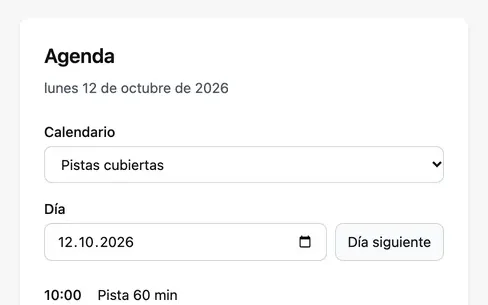
Detailed brief · screenshots
Appointments for local businesses
38 of 38 requirements · 5 cycles
Each cycle ended by using the product: an agenda that only showed today, no menu, a job open to anyone.
Read the project →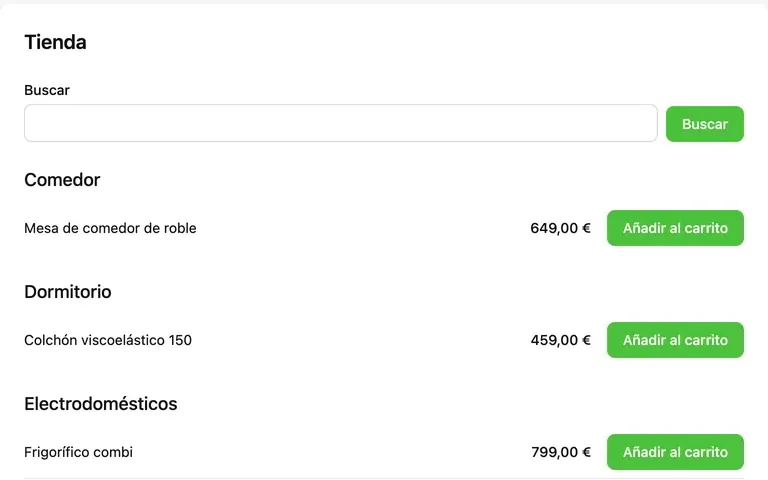
Five-line brief
Credit, an online store and a sales network
24 of 24 requirements · 272 tests
Every test green and nobody could buy: no “Add to cart” button. An API scenario alone is built as an API.
Read the project →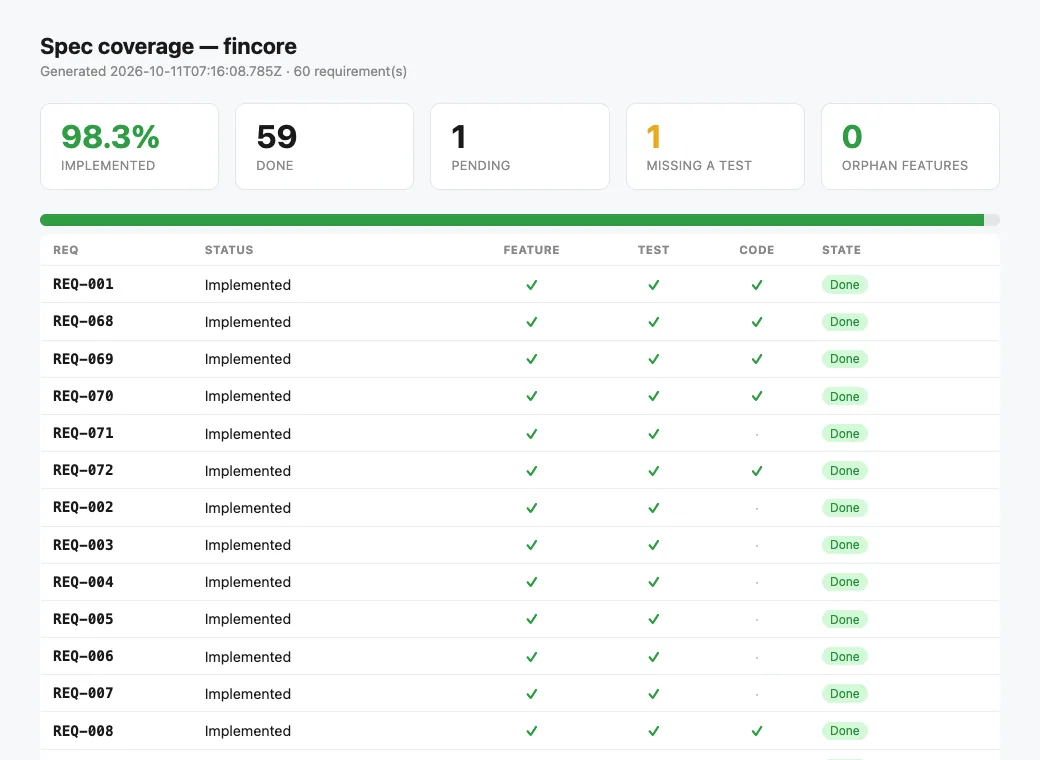
Architecture-heavy brief
Core banking
59 of 60 requirements · 112 tests
1 waiting for an answer
The app did not start with the gate green. A startup test with no doubles now runs in the suite.
Read the project →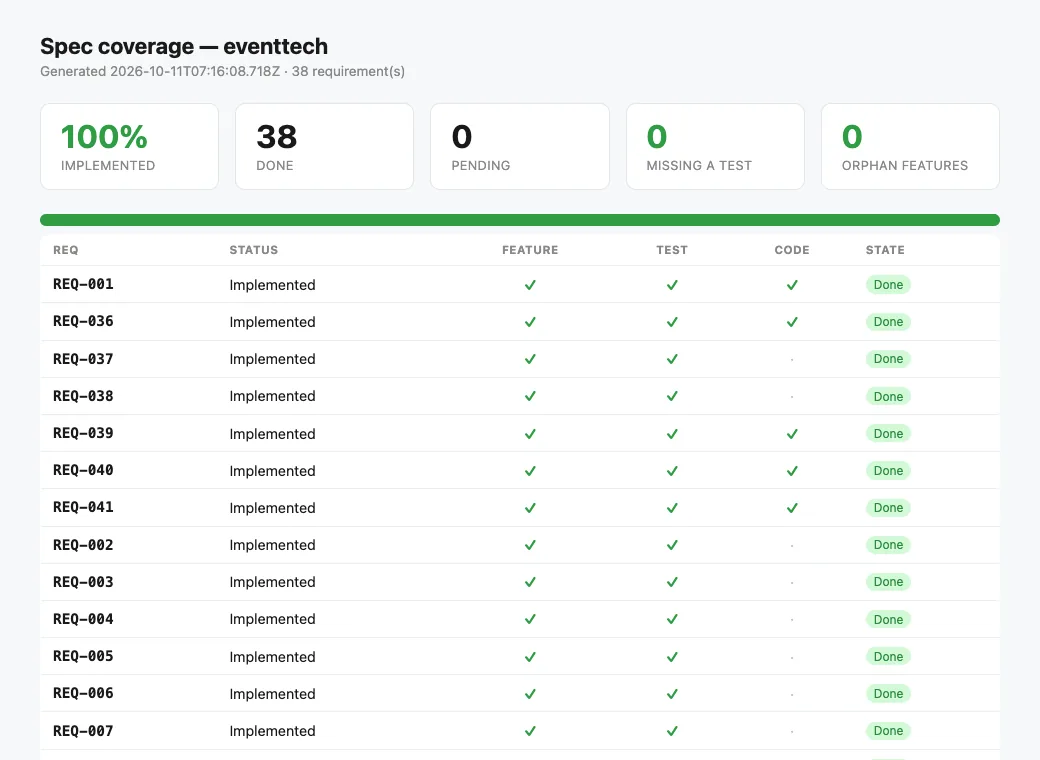
Architecture-heavy brief
Event operations, rebuilt from facts
38 of 38 requirements · 71 tests
Nobody could see a session's free seats. Two requirements came back as MODIFIED changes.
Read the project →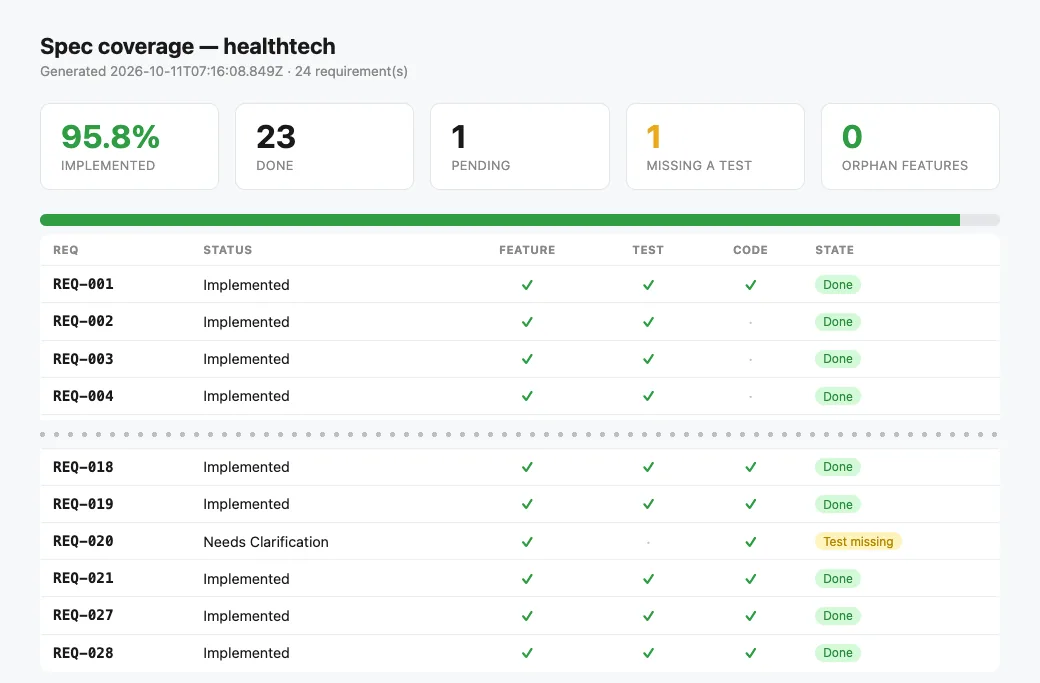
Regulated domain
Clinical cases
23 of 24 requirements · 35 tests
1 waiting for an answer
Two reads left no trace in the access log. Drug interactions wait for the client instead of a guess.
Read the project →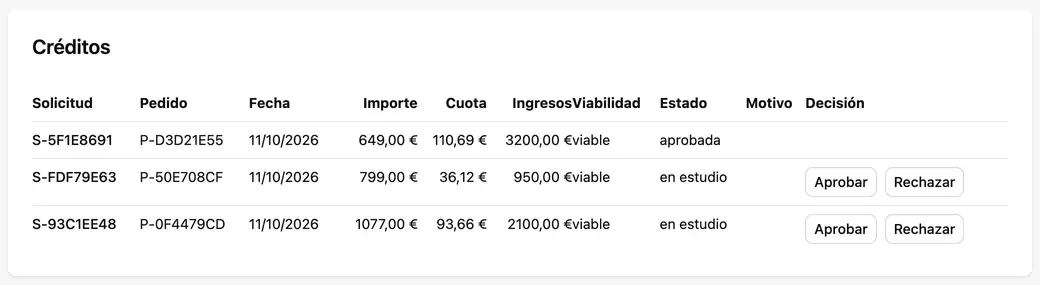
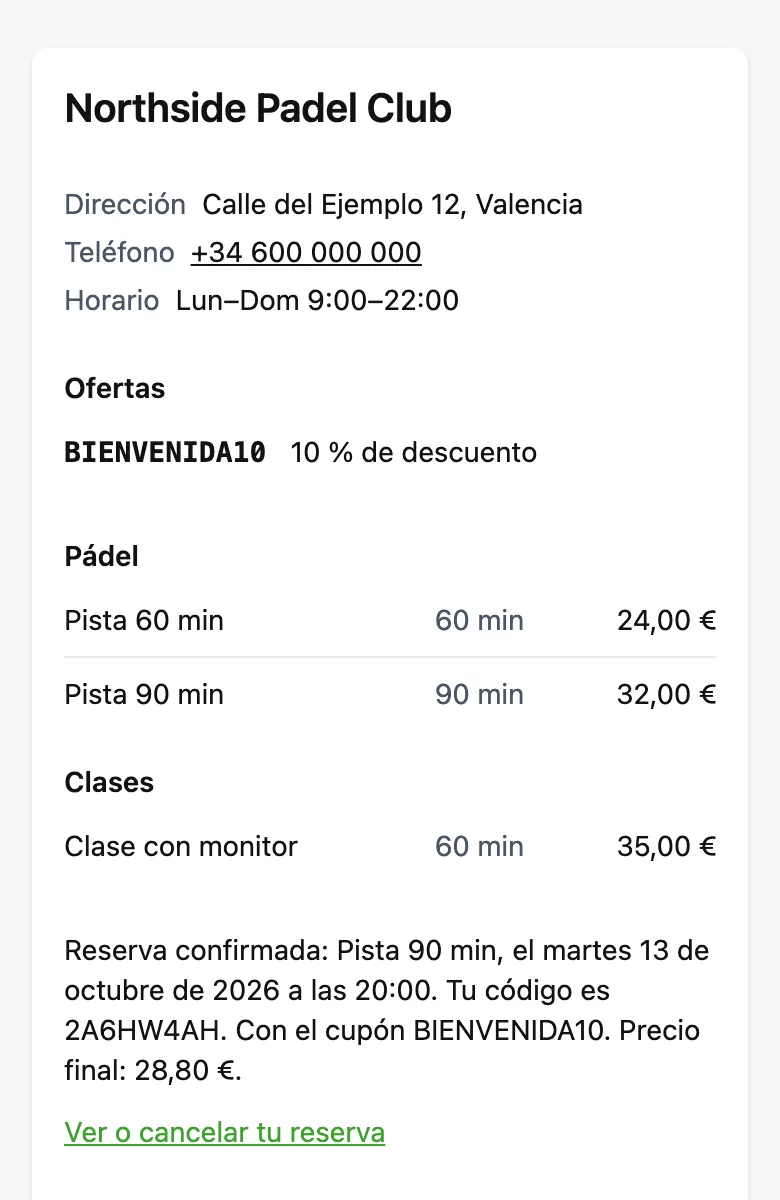
Real screens from the pilots, with invented data. Their interfaces are in Spanish, as their clients asked.
All six projects, compared → Seven of their modules, as installable packs →
For the product owner
specgate report turns the matrix into a page
anyone can read: what is done, what is pending, what is missing a test.
This is the clinical-cases pilot as it stands — one requirement left
open on purpose, because only the client can say which drug
interactions to check.
The harness · unattended delivery
specgate harness run takes each pending
requirement in its own git worktree, hands your agent a prompt built from
its Gherkin, runs the gate on the result, and commits only if it is
green. It never merges — the branch is yours to merge or throw away. The
agent is any shell command; there is no runtime or SDK.
harness/REQ-002
1 ✔
✔ committed on its branch
harness/REQ-003
1 ✖ SCN-004failures → next prompt2 ✔
✔ committed on its branch
harness/REQ-005
1 ✖2 ✖3 ✖
wip(REQ-005): FAILED the gate · stays Draft
A branch named after it, so a bad attempt never touches your checkout.
The gate's findings go back to the agent, up to max_attempts.
A requirement waiting for the client is skipped, not guessed.
specgate harness report: first-attempt rate and time per delivered requirement.
specgate harness run --agent "claude -p < {prompt_file}"
specgate harness run --agent "aider --yes --message-file {prompt_file}"
specgate harness run --agent "./my-wrapper.sh {prompt_file}"
Wired from one definition
claudeclaude-plugincursorcopilotwindsurfaidergeminiclinecodexantigravity
Watch a real run → How the harness works → Choosing your agent →
Green on the day you adopt it, stricter with every requirement you deliver — and a green run always says what it did not check.
Draft
Except honesty: no scenario without steps, no keyword Cucumber would read as prose.
Needs Clarification
From the client. Until then the harness skips it and done
refuses it.
In progress
One that mentions it — the moment work on it has started.
Implemented · Verified · Released
Every file it points at exists, its scenario has real steps, and the suite is green.
Evidence
Each one exists because the loop was caught approving work it had not checked — found by running the tool on real projects, and now a test that fails when the guard is removed.
1 passed · 0 failed.
Now touching spec.md or features/** fails the
attempt, with the diff fed back.done closed a requirement that was still
waiting for the client, with no test behind it. Now it
refuses, and status lists it apart with the question that
blocks it.GIVEN parsed as prose — and an empty scenario passes. The
gate now refuses a scenario Cucumber would see as empty.If you know OpenSpec
OpenSpec made the change loop popular, and it is the tool to look at first. It checks the shape of your specification and leaves the proof to you. Specgate is the proof.
When an agent says “done”
OpenSpecArchive asks to continue if tasks are unticked; --yes skips it. Verify is an AI review that “won't block archive”.
Specgatedone refuses until a test names the requirement and your suite passes.
When the draft comes from a client's brief
OpenSpecThe prompt asks the agent not to invent intent. Nothing checks it.
Specgatespecgate draft stops on a fee, limit or number the brief never stated.
When only the client can answer
OpenSpecThe agent records an assumption and carries on.
SpecgateNeeds Clarification blocks building and closing it until someone answers.
When you hand the work to an agent
OpenSpec/opsx:apply works through the tasks in your session.
Specgateharness run: one branch per requirement, the gate after each attempt, never merges.
Where OpenSpec is ahead: far more users,
30+ agent integrations against our 10, customisable workflows, and no
tests required to start. If you want the change loop and nothing else,
it is the better tool. Already on it? Keep it, and let
specgate verify gate what it archives.
Specgate or OpenSpec, in detail → Spec Kit, Cursor rules and the rest →
Yes, that is the common case. specgate init adopts it in
place without touching your code, and the gate is green the same day:
a Draft requirement owes nothing yet.
Safer than letting it write the code from the brief. The checklist lists every value the agent added, and anything nobody can answer becomes a question that blocks its requirement. You review a short list, not the whole draft.
No. A bugfix or a refactor that does not change contracted behaviour adds none; the gate only asks for what delivered requirements owe.
Not quietly. Over MCP, tools that write the specification refuse unless a change is open; in the harness, touching the spec fails the attempt.
Never. It leaves one branch per requirement and stops. Merging is a judgement, and it stays yours.
npx @rsaglobaltech/specgate@latest init
specgate draft↑↓ to navigate · ↵ to open · Esc to close